
Quick answer: iGaming affiliate campaign tracking works when the operator can follow one visit through a named campaign, approved traffic source, click, registration, qualified FTD and eventual commission. Give each identifier one job. Capture source parameters when the click happens, preserve the attribution key through registration, and report source cohorts using the same qualification and date rules. A partner total cannot tell you which placement earned the money or which source needs attention.
An affiliate sends traffic to the same casino offer from a comparison page, a newsletter and a paid search campaign. At month end, the partner dashboard shows one row of clicks, FTDs and commission. The total may be correct. It is still a poor answer to the operator’s next question: which of those three sources brought players who qualified, and which one generated the rejected or disputed events?
The answer depends on decisions made before the first click. If the tracking link contains only an affiliate ID, the source cannot be recovered reliably from the final FTD. A referrer may be absent, a redirect may hide it, and the player may complete registration later. Naming a source after the fact is an inference, not attribution evidence.
This is a technical buying question for operators. During a platform demonstration, ask to create two campaigns for one affiliate, send test clicks with different SubIDs, complete one delayed FTD, and retrieve the source and commission decision from the resulting records. The sequence tells you more than a polished overview chart.
Decide what each identifier means
Teams often use “campaign,” “source,” “SubID” and “click ID” as if they were interchangeable. They are different levels of the record. The affiliate identifies the commercial partner. A campaign groups a particular promotion. A source says where the traffic came from. A placement or creative narrows that source. The click identifies one arrival. The player key connects subsequent operator events to that arrival, subject to the agreed attribution rule.
Write down the grain of every report before building the link. If finance receives a monthly affiliate total while the marketing team investigates by campaign and source, the two views need to roll up from the same accepted events. Otherwise, a “source report” becomes a separate spreadsheet with its own definitions.
| Field | Purpose | Failure if it is missing or overloaded |
|---|---|---|
| Affiliate ID | Identifies the contracted partner. | A source may be credited to the wrong commercial relationship. |
| Campaign ID | Groups a promotion and its link configuration. | Creative or destination changes erase the distinction between old and new traffic. |
| Source and placement codes | Separate the partner’s inventory within a campaign. | Good and poor placements are averaged into one partner total. |
| Affiliate click ID | Allows the affiliate to match an operator event to its own click record. | A partner postback may be impossible to reconcile in the partner’s system. |
| Platform click and player keys | Connect the tracked visit to the operator’s registration and later events. | The FTD can exist without a defensible source lineage. |
| Offer, brand and deal version | Identify the destination and terms effective for that event. | A later offer edit can make historical commission hard to reproduce. |
A campaign ID should stay stable for the campaign it represents. If a partner changes from an approved newsletter placement to an unapproved paid search placement, that is a different source decision. Do not hide the change by reusing the old source code. The reporting taxonomy is part of the commercial control, not decorative metadata.
Build the campaign before distributing the link
The first checkpoint is mundane: who created the link, which affiliate owns it, and what campaign does it represent? Scaleo’s offer Tracking panel shows an affiliate selector, a campaign selector and a copyable tracking link. That is a useful place to anchor the manager’s approval record. The screenshot shows the controls; it does not, by itself, prove any particular operator’s approval workflow.
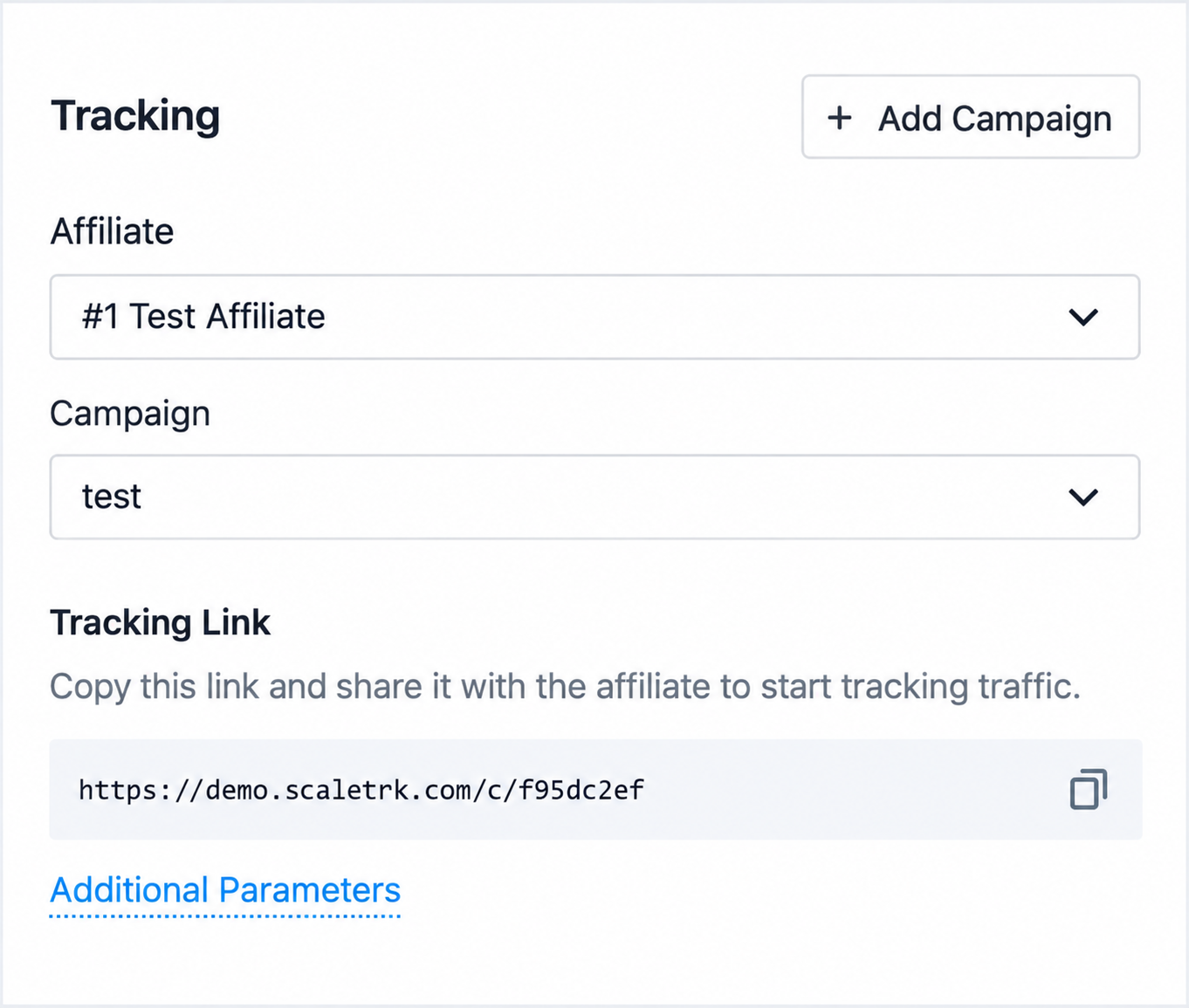
Make campaign creation a small controlled handoff between the affiliate manager and the partner. The manager needs the destination brand, allowed markets, proposed channel, landing page, creative, agreed deal and owner. The partner needs a link that is ready to place and a parameter specification it can actually implement. A free-text “traffic source” field in an email does not keep those two records synchronized.
What happens if the partner duplicates the campaign for a new language or replaces the landing page? Decide whether that is a new campaign or a revision of the existing one. A changed destination may be operationally harmless; a changed traffic channel may alter approval, compliance review or economics. Retain the prior configuration long enough to explain historical clicks. Ask the software vendor to show the history rather than assuming that the current campaign screen is a historical snapshot.
Give SubIDs fixed meanings
Scaleo’s Additional Parameters view lists aff_click_id and sub_id1 through sub_id5. The interface describes the SubID fields as traffic sub-sources. Those fields are flexible; that flexibility is exactly why the operator should publish a contract for their use. If one partner puts a channel in sub_id1 while another puts an ad ID there, a report grouped by that column is not a channel report.
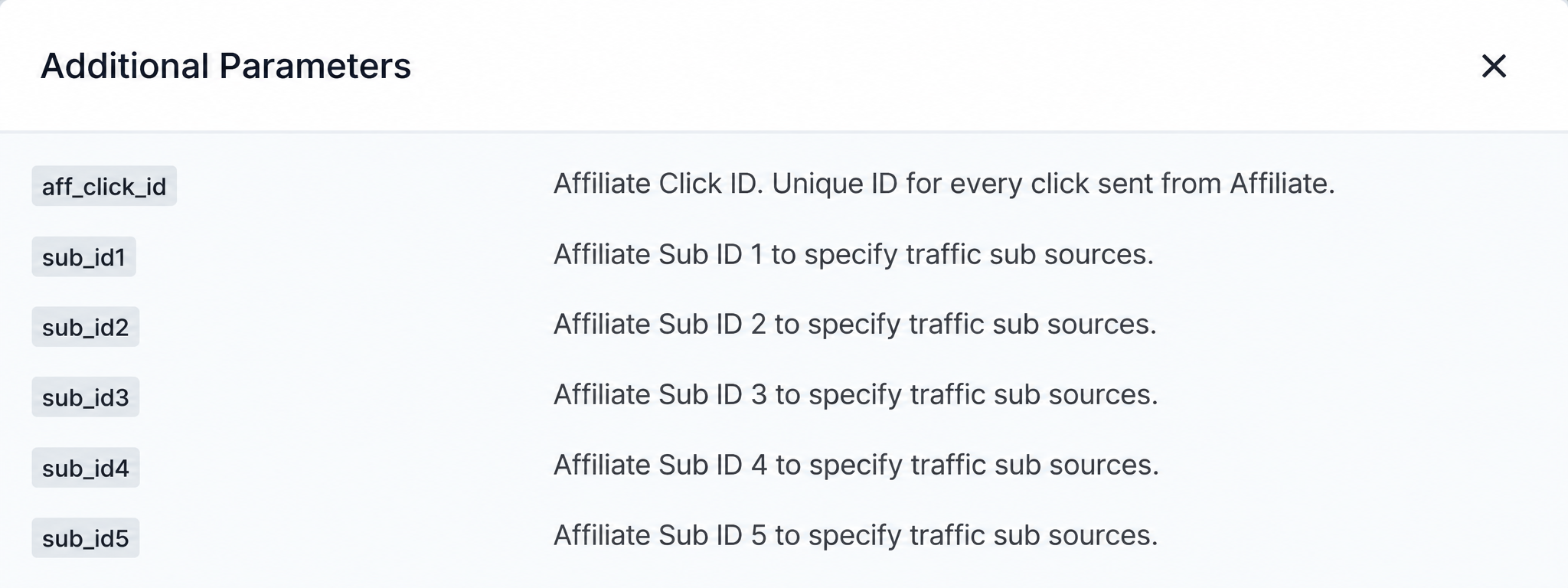
One workable convention is sub_id1 for channel, sub_id2 for publisher property or placement, sub_id3 for creative, sub_id4 for the partner’s campaign code and sub_id5 for an agreed experiment label. This is an example taxonomy, not a Scaleo default. Use fewer fields if that is all the program can govern. Consistency matters more than filling every slot.
For an illustrative link, a partner might send sub_id1=paid_search, sub_id2=generic_sports and sub_id3=ad17. A separate aff_click_id=clk8f21 can carry the partner’s click reference. These values are synthetic. A production link should use the parameter names and allowed values agreed in the integration, then URL-encode each value correctly. The URI syntax standard explains why reserved characters require careful percent encoding.
Do not put a player’s email, phone number, deposit amount, KYC status or a secret in a tracking URL. Query strings can be retained in browser history, server logs and referrer data; MITRE documents this exposure. Use opaque identifiers and keep the player record in the operator’s controlled systems. A source code should describe a campaign, not identify a person.
Agree on null values too. Does a missing sub_id2 mean an untagged placement, a direct link, or a technical loss during redirect? Those are different cases. Preserve the raw value and a normalized reporting value separately if you need a tidy dashboard. Do not silently recode missing source data into the most common channel.
Keep the partner’s click ID separate from your attribution key
The field labeled aff_click_id is for an affiliate-supplied click identifier. It helps the affiliate match a conversion callback to its own system. The operator still needs its own reliable attribution reference from the tracked click through registration and player events. Confusing the two keys creates a hard-to-debug failure: the operator sees a valid FTD, the partner receives an unmatched callback, and both teams call it a tracking issue for different reasons.
At the click, store the campaign and source values with the tracking event. At registration, persist the agreed attribution key against the operator’s player reference. At FTD, send the player event and attribution reference through the approved server-side integration. The exact field names depend on the operator’s stack. The invariant is the join: one source-tagged click must be traceable to the registration and to the accepted or rejected FTD.
Do not treat every registration as a payable FTD. The operator’s qualification rule may include deposit amount, KYC outcome, market eligibility and duplicate-player checks. The source report should retain registrations, pending FTDs, approved FTDs and rejected events as separate states. If only the approved count survives, a manager cannot tell whether a source stopped sending traffic or started sending traffic that fails qualification.
Our postback troubleshooting guide covers missing conversion events. The campaign test here is narrower: confirm that the campaign and SubID values attached to the original click survive the same path as the event, and that retries do not invent a second source or conversion.
Measure source quality with matched windows
Once the event chain is intact, the reporting question changes. A source with many clicks and few FTDs may be poor traffic. It may also send players who take longer to register or deposit. Compare like with like: the same brand, market, offer, landing page, qualification rule and observation window. Then inspect the distribution of pending and rejected events before reducing a source to one conversion rate.
Choose a click cohort and give it enough time to mature. For example, group clicks from a defined week, then count the registrations and qualified FTDs attributable to those clicks through the agreed window. A calendar-week FTD report answers a different question because some of its players clicked earlier. Both views are useful; they should not be mixed in one ratio without saying which dates govern numerator and denominator.
| Metric | Definition to lock | What it can reveal |
|---|---|---|
| Click-to-registration rate | Attributed registrations divided by valid clicks in the chosen click cohort. | Landing-page, channel or registration-path friction. |
| Registration-to-qualified-FTD rate | Approved qualified FTDs divided by attributed registrations after the agreed maturation window. | Deposit intent, payment friction or qualification differences. |
| Pending and rejected share | Status counts with explicit reasons, measured from the same eligible event set. | Review backlog, rule mismatch or source quality issues. |
| Cost per qualified FTD | Approved acquisition commission and agreed source costs divided by qualified FTDs. | Whether an apparently cheap channel remains cheap after qualification. |
| Cohort revenue and commission | Revenue base and commission under the deal terms for the attributed player cohort, with period and currency stated. | Value beyond the first deposit, especially under RevShare or hybrid deals. |
The formulas require discipline. If a source has zero qualified FTDs, cost per qualified FTD is undefined, not zero. If the cohort is still within its qualification window, label the result provisional. If an affiliate buys media independently, the operator may know its commission cost but not the partner’s ad spend. Do not call that number total acquisition cost.
Scaleo’s Daily report screenshot shows the selected grouping, click counts and approved conversion metrics. It is a real product view, although this capture is grouped by day and hour, not by SubID. In a demo, ask the team to group the same event set by affiliate, campaign and source parameter, then export the underlying rows. The totals should reconcile when you remove a grouping.
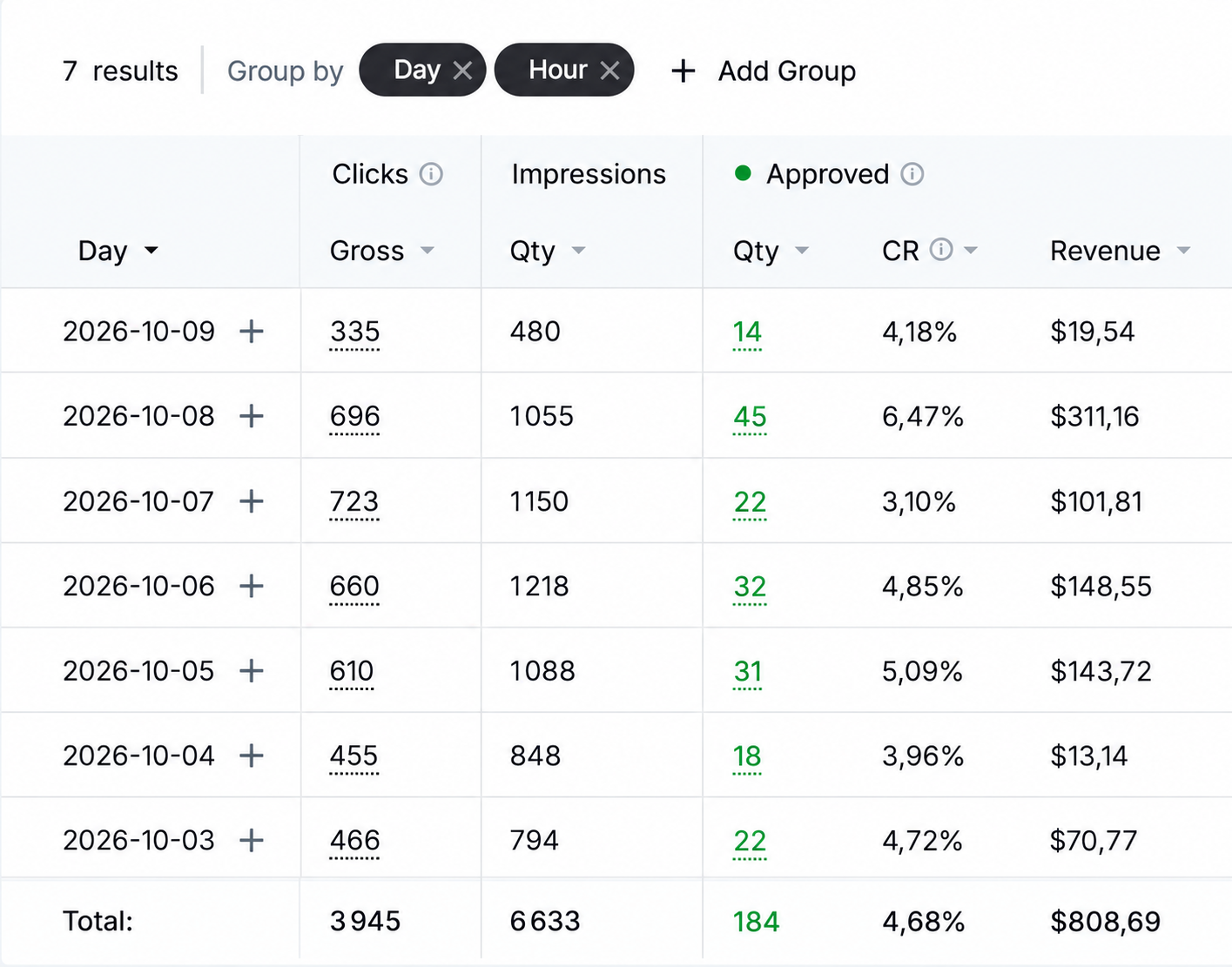
A report is also a permissions question. The operator may need source-level exceptions and player references; the affiliate needs enough detail to verify its own results without seeing unrelated partners or personal player data. Ask to compare the manager view and partner view for the same campaign. Different access is expected. Different definitions of an approved FTD are not.
Separate invalid traffic from a weak source
A low-performing campaign is not automatically fraudulent. A high-performing campaign is not automatically permitted. Keep source performance, traffic validity and marketing approval as separate decisions. A burst of proxy or bot clicks needs traffic review; a low registration rate needs funnel diagnosis; an unapproved paid channel needs a policy response. One generic “bad source” label makes each problem harder to resolve.
Scaleo’s Tracking settings include a Block Suspicious Traffic control, selectable VPN, Proxy and Bot categories, a separate duplicate-click option and invalid-traffic forwarding. The screenshot shows one configuration in the interface, not a recommended default. The operator should decide which controls apply to an offer and verify how invalid clicks appear in reports before making decisions about commissions or redirect behavior.
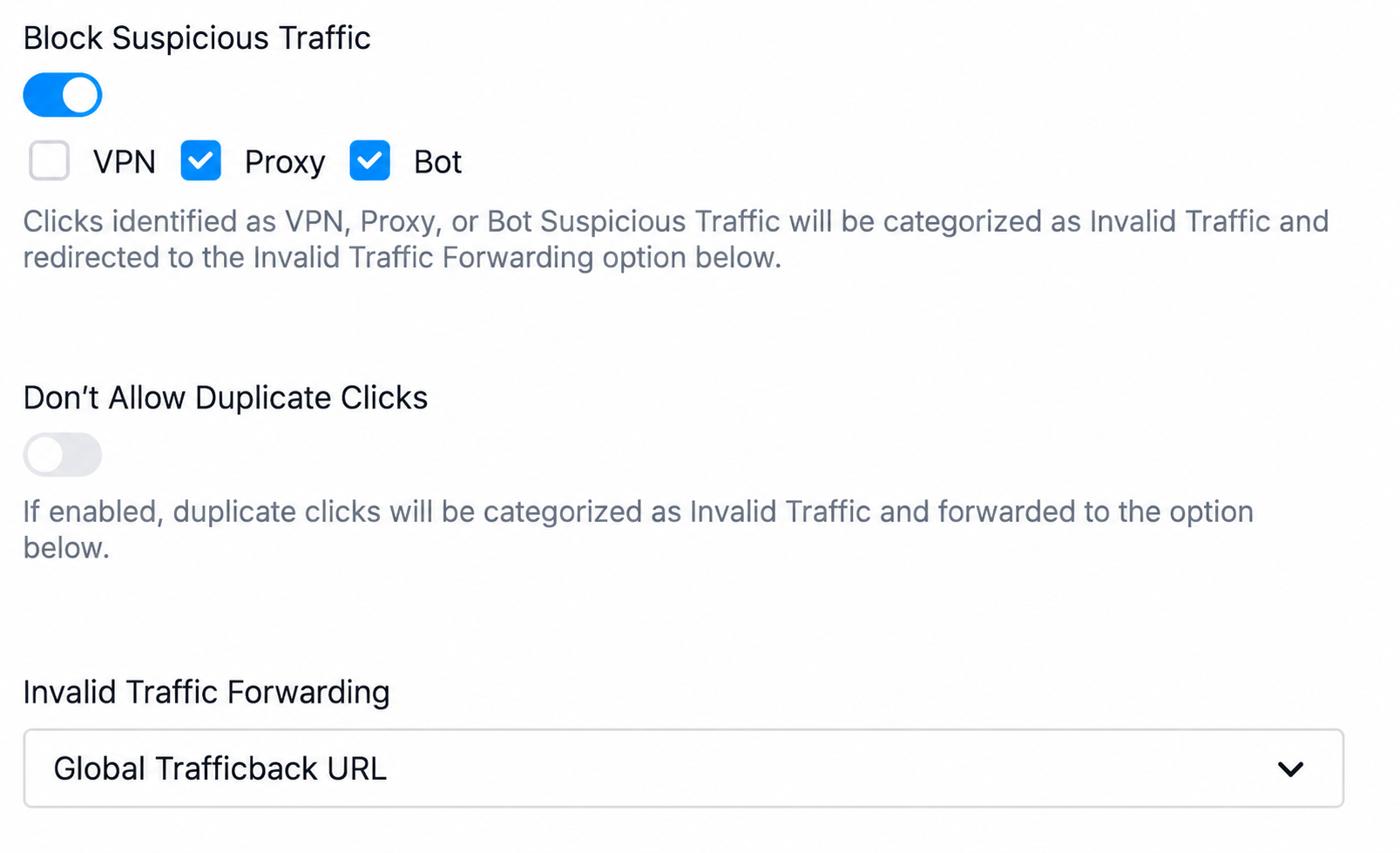
The denominator matters. A source can look better if invalid clicks disappear from its click count while rejected conversions remain elsewhere. For an investigation, retain gross clicks, valid clicks, invalid clicks and reason codes. Decide which click count a manager-facing rate uses, and keep the other counts available. A partner dispute is easier to settle when the system can show why a click was excluded.
Geo eligibility belongs in this chain too. A campaign may be approved only for certain markets, while a source parameter describes where a partner placed the promotion. The two are not substitutes. The visitor’s actual eligibility is determined under the offer and operator rules; a partner-supplied label cannot make a restricted click eligible. Our geo targeting guide sets out the offer and payout decisions that should be tested separately.
Give operations a reconciliation path
The manager’s campaign dashboard is the start of an investigation, not the end. When a partner asks why one source earned less, operations should be able to identify the source-tagged clicks, attributed player events, qualification statuses, effective commission terms and final statement lines. If any join is unavailable, document the gap. A manual adjustment may settle an invoice; it does not repair the source record for the next period.
Close each period from a stable definition. Export the same date range and statuses used in the partner statement, then group and ungroup by campaign and SubID. Sum the commission by campaign; it should equal the affiliate total for that scope, allowing for disclosed adjustments and rounding. If it does not, ask whether the report is using click date, event date, approval date or statement date. Those boundaries can produce legitimate differences, but the difference needs an explanation.
For a larger program, keep a small exception queue. Examples include a missing source parameter, a campaign linked to the wrong offer, an FTD with no attribution key, an event approved after the reporting cutoff and a partner click ID that cannot be returned in the partner postback. Assign each case to the team that can change the underlying record or rule. The affiliate manager should not have to resolve a data contract defect by editing a spreadsheet total.
A ten-case demo that exposes the weak points
Use one test affiliate, two named campaigns and a small set of synthetic clicks and player events. Ask the vendor to show the link, raw event, report row and partner-visible outcome for each case. A test environment is sufficient; no real player data is needed.
- Create two campaigns for one affiliate, each with a different approved traffic source.
- Generate a link with
sub_id1andsub_id2; confirm the values on the recorded click. - Send a click with one missing SubID; confirm that missing remains distinguishable from a named source.
- Send a partner
aff_click_idand verify it is available for the partner’s conversion reconciliation. - Register from the first campaign, then send a delayed qualified FTD; trace the FTD back to the original source.
- Send a second registration that fails the written FTD rule; inspect pending or rejected status and reason.
- Repeat the same conversion message; confirm that the report and commission do not count it twice.
- Send an invalid click under the configured traffic rule; compare gross, valid and invalid click counts.
- Change or pause the second campaign; verify how old clicks and new clicks are represented.
- Export the source report and reconcile its grouped commission to the affiliate total and partner statement.
For the delayed FTD, specify the attribution window before the test. For the repeated conversion, specify the upstream event ID. For the campaign change, ask whether the old configuration can still be inspected. The vendor should state which behavior is native, which depends on the operator’s integration and which needs a process outside the platform. A credible answer can include limitations.
Keep the test evidence. An exported click row, a conversion row, the report filters and the final statement line form a reusable acceptance record. When the next partner reports a missing SubID or disputed FTD, the team can compare the live case with the known-good path.
Bring your source taxonomy to the demo.
If you are evaluating campaign tracking for an iGaming program, bring one approved campaign, one disputed source and a sample event path to a Scaleo demo. Ask to follow the campaign and SubIDs through the click, FTD, report and partner statement.
Frequently asked questions
What is the difference between a campaign ID and a SubID?
A campaign ID identifies a named promotion and its link configuration. A SubID carries an agreed detail within that campaign, such as channel, placement or creative. The operator should define each SubID field consistently before affiliates distribute links.
Is an affiliate click ID the same as the platform’s attribution click key?
No. The affiliate click ID is supplied by the partner so it can match conversion callbacks to its own click log. The operator also needs a reliable attribution reference that connects the tracked visit to registration and later player events.
Can a missing SubID be filled from the HTTP referrer?
A referrer can help investigate a missing value, but it is not a reliable replacement for the source parameter captured on the click. Redirects, browser settings and app handoffs can remove or change referrer data. Keep the missing state visible.
Which date should a source conversion rate use?
State the cohort rule. A click-cohort rate counts qualified FTDs attributed to clicks from a defined period after an agreed maturation window. An event-date report counts FTDs recorded in a period, including players who clicked earlier. Both are valid for different questions.
What should an operator require in a campaign tracking demo?
Create two campaigns for one affiliate, pass distinct SubIDs, complete a delayed FTD, inspect a rejected event, and reconcile the source report to the affiliate statement. Ask to see the underlying click and conversion records, not only totals.